Download TeleFinder Client
Download the TeleFinder BBS Client and connect to the system using a friendly Windows Forms desktop interface.
Download TeleFinder ClientWhat is a BBS?
A BBS, or Bulletin Board System, is an online community system where users can log in, send mail, post forum messages, upload and download files, chat with other users, and access games or services. BBS systems were popular before modern social media and are still enjoyed today by retro computer fans and online communities.
What is TeleFinder BBS?
TeleFinder BBS is a modern Windows-style BBS client and server system. Instead of only using an old text terminal screen, TeleFinder gives users buttons, windows, file browsers, mail inboxes, chat rooms, public conferences, web space, and games.
Features
User Accounts
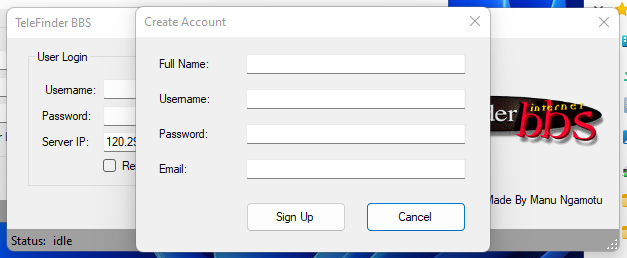
Create an account and log in to your personal BBS desktop.
BBS Mail
Read and send messages using your BBS e-mail address.
File Browser
Upload and download files shared by other users.
Chat Room
Talk to other users in real time.
My Web Space
Upload your own HTML pages, images, and files.
Games
Enjoy classic-style BBS games and online fun.
How to Login to TeleFinder BBS
Follow these steps after downloading and opening the TeleFinder Client.
Open the Client
Start the TeleFinder BBS Client on your Windows computer.
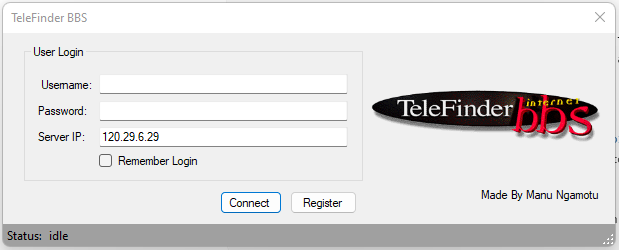
Enter Your Login
Type your username and password into the login screen.
Enter Server IP
Use the server IP shown in the client login screen.
120.29.6.29
Click Connect
Press the Connect button to log in to your TeleFinder desktop.
Getting Started Guide
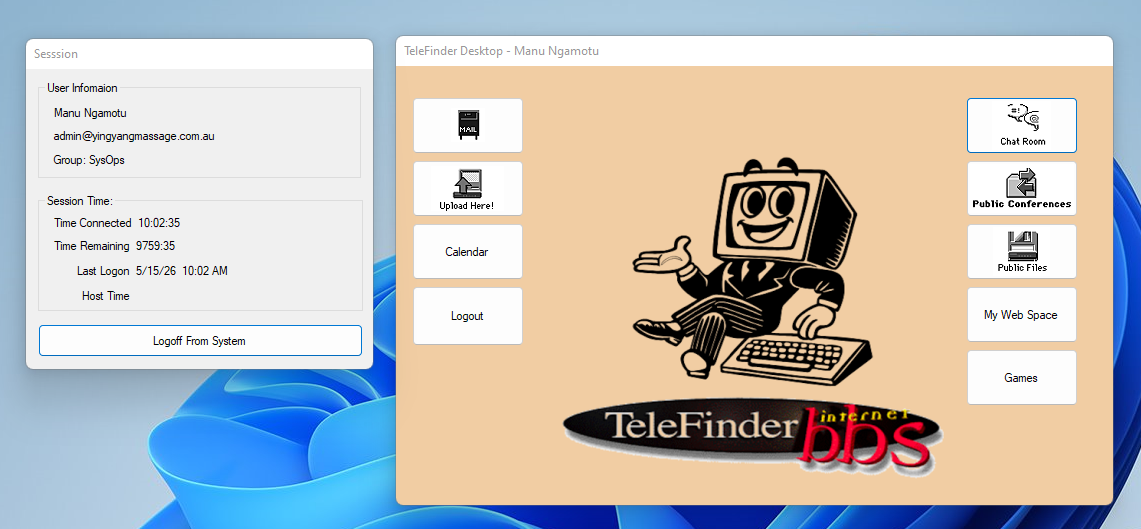
Your TeleFinder Desktop
After logging in, you will see your TeleFinder Desktop. This is where you can open Mail, Upload files, use the Calendar, enter the Chat Room, view Public Conferences, browse Public Files, open My Web Space, and play Games.
Your Web Space
Your personal web space is:
http://yingyangmassage.com.au/username
Replace username with your own TeleFinder username.
Use the My Web Space button in the client to manage your files. You can upload HTML pages, images, and any files you like.
Uploading Files
Click Upload in the main panel to share files with other users.
Uploaded files are available in the File Browser for everyone.
Your TeleFinder BBS e-mail address is:
YourUsername@yingyangmassage.com.au
Open Mail Inbox inside the TeleFinder Client to read and send messages.
You can also connect using external e-mail clients such as:
- Microsoft Outlook
- Mozilla Thunderbird
- Windows Mail
- Mobile Phone Mail Apps
Mail Server Settings
| Incoming Mail Server (POP3) | mail.yingyangmassage.com.au |
| Outgoing Mail Server (SMTP) | mail.yingyangmassage.com.au |
| Username | Your TeleFinder username |
| Password | Your TeleFinder password |
| POP3 Port | 110 |
| SMTP Port | 25 |
This allows you to use your TeleFinder BBS account with standard desktop and mobile e-mail software.
Forums / Public Conferences
Use Public Conferences to post and reply to messages in the BBS community.
Chat
Use the Chat Room button to talk with other users in real time.
Need Help?
If you have questions, send mail to admin@yingyangmassage.com.au or contact the administrator.
Traditional BBS vs TeleFinder Windows Forms BBS Client
Traditional BBS
Usually text-based and controlled with keyboard commands.
Users connect using a terminal program over modem, Telnet, or SSH.
Menus are often ANSI text screens with numbered options.
TeleFinder BBS Client
Uses a Windows Forms graphical interface with buttons and windows.
Users can click Mail, Upload, Chat Room, Public Files, My Web Space, and Games.
It keeps the classic BBS idea but makes it easier for modern users.
TeleFinder Client Updates & Changelog
🚀 New Features
🎮 Games Menu
A dedicated gaming hub has been added to the TeleFinder Client dashboard, featuring classic BBS door games and arcade experiences.
- Snakes and Ladders
- Word Scramble
- BBS Trivia
- Ping Pong Arcade
- Train Simulator
- Legend of the Red Dragon (LORD)
- TradeWars 2002
- Barren Realms Elite (BRE)
- Usurper RPG
- Amiga Classics Collection
🔄 Automatic Update System
TeleFinder Client now includes a fully automatic update system.
- Background version checking
- Automatic ZIP package downloading
- Self-updating launcher system
- Automatic restart after updates
⏱️ Session Management
- Integrated "Logoff From System" button
- Improved session timer synchronization
- Server-side time bank saving
🛠️ Technical Improvements
🐞 User Interface Fixes
- Signup form display bug fixed
- DNS hostname corrections
- Improved dashboard navigation wiring
- Improved startup stability
🔌 Connectivity Improvements
- Improved TCP registration handling
- Better timeout and reconnect logic
- BinkP authentication compatibility improvements
- Improved fsxNet hub connectivity
🖥️ Server Improvements
- Automatic watchdog monitoring utility
- Server auto-restart protection
- Scheduled BinkP synchronization tasks
- Automatic tosser processing support
📅 Latest Update
Last Updated: May 15, 2026